
Logitech MX Master 3S vs Logitech MX Anywhere 3S (2026): Which Mouse Should You Buy?
Introduction
Choosing the right productivity mouse can make a noticeable difference in your daily workflow. Whether you’re editing documents, working with spreadsheets, creating content, programming, or simply browsing the web, a comfortable and responsive mouse helps reduce fatigue while improving efficiency.
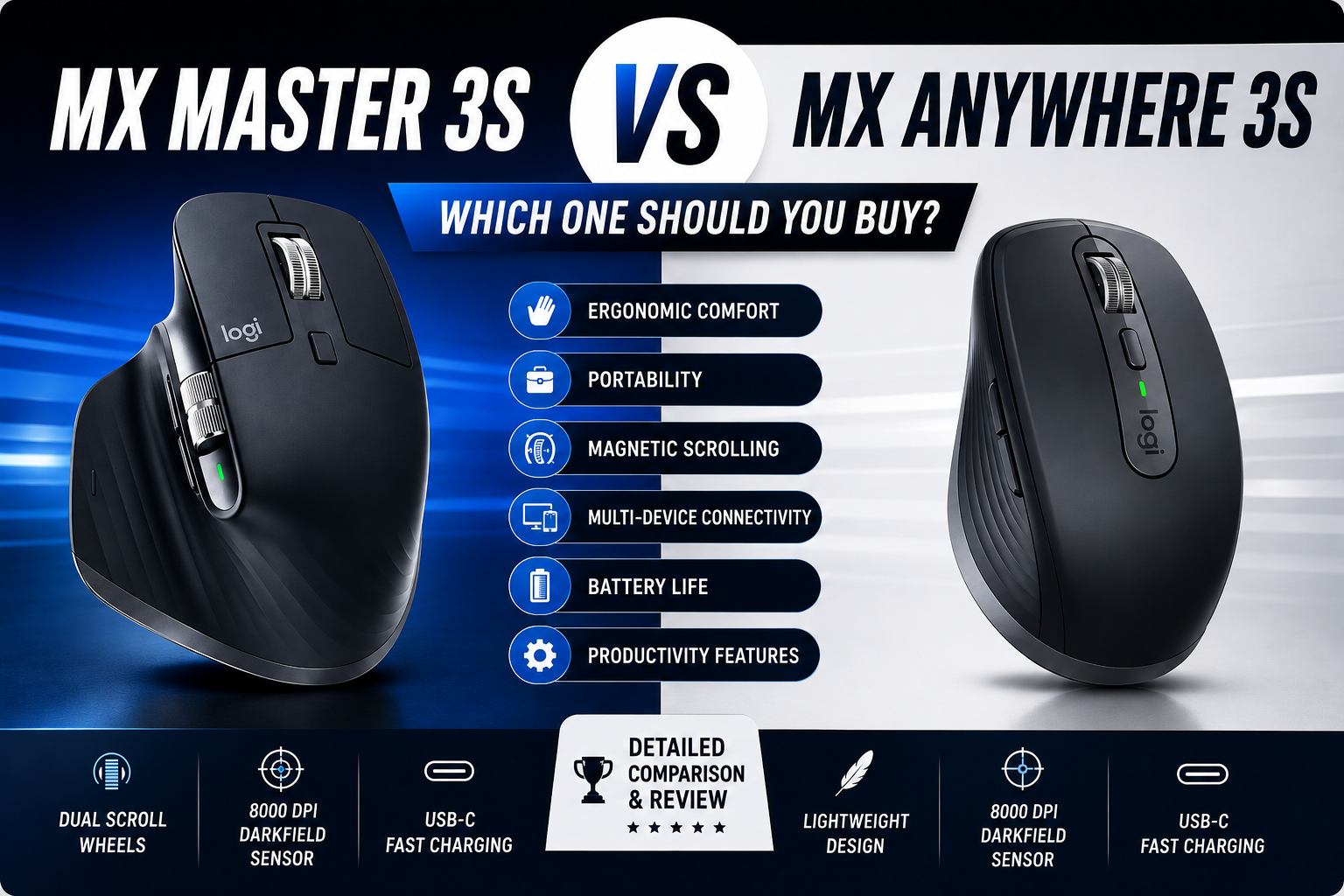
Two of Logitech’s most popular premium wireless mice are the MX Master 3S and the MX Anywhere 3S. At first glance they share many of the same technologies, including an 8,000 DPI Darkfield sensor, quiet clicks, USB-C charging, multi-device connectivity, and compatibility with Logi Options+. However, they are designed for different types of users.
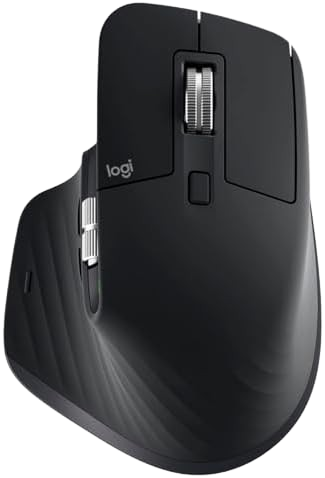
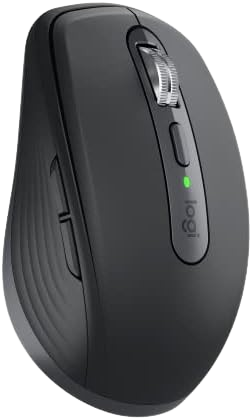
The MX Master 3S is a full-size ergonomic mouse built for professionals who spend long hours at a desk. It includes additional controls such as a horizontal scroll wheel and a thumb-rest gesture button, making it especially useful for productivity applications. The MX Anywhere 3S, on the other hand, focuses on portability with a smaller, lighter design that easily fits into a laptop bag while retaining many of Logitech’s flagship features.
In this detailed comparison, we’ll examine their design, comfort, features, performance, battery life, software, and overall value to help you decide which mouse best suits your workflow.
Quick Verdict
If you primarily work from a desk and spend several hours each day using a mouse, the Logitech MX Master 3S is the stronger overall choice. Its ergonomic shape, secondary scroll wheel, additional programmable controls, and premium feel make it one of the best productivity mice available.
If portability is your top priority, the Logitech MX Anywhere 3S is the better option. Its compact size and lighter weight make it ideal for travel, hybrid work, and users who frequently switch between locations without giving up premium features like Darkfield tracking or multi-device pairing.
Our Recommendation
🏆 Best Overall Productivity Mouse: Logitech MX Master 3S
🎒 Best Portable Productivity Mouse: Logitech MX Anywhere 3S
Design & Build Quality
Logitech MX Master 3S
The MX Master 3S features a premium ergonomic design that is specifically shaped for right-handed users. Its sculpted body naturally supports the palm, thumb, and fingers, reducing wrist movement during extended work sessions.
The mouse is constructed from high-quality materials with a soft-touch finish that feels durable and comfortable. Logitech has also positioned the thumb buttons, gesture button, and horizontal scroll wheel within easy reach, making multitasking significantly more efficient.
Although the MX Master 3S is noticeably larger and heavier than the MX Anywhere 3S, that extra size contributes to its excellent stability and comfort for prolonged desktop use.
Pros
- Premium build quality
- Excellent ergonomics
- Comfortable for long working sessions
- Additional horizontal scroll wheel
- Easy-to-reach controls
Logitech MX Anywhere 3S
The MX Anywhere 3S follows a different design philosophy. Instead of maximizing comfort for desk work, it prioritizes portability.
Its compact body easily fits into backpacks, laptop sleeves, or even jacket pockets, making it an excellent companion for professionals who frequently travel or work in different locations.
Despite its smaller footprint, the build quality remains excellent. The mouse still offers premium materials, precise construction, quiet buttons, and Logitech’s MagSpeed scroll wheel.
Because of its symmetrical shape, it also accommodates a wider variety of grip styles, although users with larger hands may find it less comfortable during long work sessions than the MX Master 3S.
Pros
- Compact and lightweight
- Easy to carry
- Premium construction
- Excellent travel companion
- Comfortable for smaller hands
Comfort & Ergonomics
Comfort is one of the biggest differences between these two mice.
If you spend eight or more hours each day working at a desk, the MX Master 3S provides a more natural hand position thanks to its sculpted ergonomic shape. The thumb rest helps reduce strain, while the larger body allows your entire hand to rest comfortably without excessive finger tension.
The MX Anywhere 3S, while still comfortable for everyday use, requires a more compact grip. For users with smaller hands or those who primarily use a laptop on the go, this design can actually feel more natural. However, larger-handed users may experience more fatigue during extended sessions because the palm isn’t supported to the same extent. Community discussions also commonly highlight the tradeoff between the Master 3S’s superior ergonomics and the Anywhere 3S’s lighter, travel-friendly form factor.
Ergonomics Winner
🏆 Logitech MX Master 3S
Its full-size ergonomic design is simply better suited to long productivity sessions, making it the stronger choice for office professionals, developers, designers, and anyone who spends most of the day at a desk.
Features Comparison
Although both mice belong to Logitech’s premium MX lineup, they are designed with different priorities in mind. They share several core technologies, but the MX Master 3S offers additional productivity-focused controls that benefit users working at a desk, while the MX Anywhere 3S focuses on delivering similar core functionality in a smaller, travel-friendly package.
Shared Features
Both the MX Master 3S and MX Anywhere 3S include:
- 8,000 DPI Darkfield sensor
- Bluetooth and Logi Bolt connectivity
- Pairing with up to three devices
- USB-C rechargeable battery
- Quiet click switches
- MagSpeed electromagnetic scroll wheel
- Logitech Logi Options+ software support
- Cross-platform compatibility (Windows, macOS, Linux, ChromeOS, and more)
These shared capabilities mean either mouse can handle professional productivity tasks with ease.
Exclusive Features of the MX Master 3S
The MX Master 3S includes several premium features not found on the MX Anywhere 3S.
Secondary Horizontal Scroll Wheel
One of the biggest advantages is the dedicated thumb-operated horizontal scroll wheel.
This is particularly useful for:
- Microsoft Excel
- Google Sheets
- Adobe Photoshop
- Adobe Premiere Pro
- Video editing timelines
- Large design canvases
Instead of holding Shift while scrolling, you can move naturally across wide documents and timelines.
Gesture Button
Hidden beneath the thumb rest is a programmable gesture button.
You can assign shortcuts such as:
- Task View
- Mission Control
- Desktop switching
- Window management
- Custom macros
For users who frequently multitask, this can significantly improve workflow efficiency.
Additional Programmable Controls
The MX Master 3S offers more customizable inputs than the MX Anywhere 3S, allowing quick access to frequently used commands in professional applications.
Examples include:
- Copy/Paste
- Undo/Redo
- Browser navigation
- Zoom
- Volume control
- Media controls
- Application-specific shortcuts
If your work involves repetitive actions, these extra controls can save time every day.
MX Anywhere 3S Highlights
Although it lacks the secondary scroll wheel and gesture button, the MX Anywhere 3S remains impressively capable.
Its strengths include:
- Compact design
- Lightweight construction
- Excellent portability
- Premium MagSpeed scrolling
- Darkfield tracking
- Quiet clicks
- Fast USB-C charging
For many laptop users, these features are more valuable than having extra buttons.
Performance Comparison
Performance is where these two mice are surprisingly similar.
Both use Logitech’s Darkfield high-precision sensor with sensitivity up to 8,000 DPI, allowing accurate tracking on almost any surface—including glass. This makes them reliable whether you’re working at a traditional desk, in a meeting room, or at a café.
Cursor Accuracy
During everyday productivity tasks, both mice feel exceptionally smooth.
Typical activities include:
- Web browsing
- Office applications
- Programming
- Graphic design
- Document editing
Neither mouse struggles with precision.
For productivity, performance differences are minimal.
Scroll Performance
Both mice feature Logitech’s MagSpeed electromagnetic scroll wheel, which automatically switches between:
- Ratchet scrolling for precise navigation
- Free-spin mode for quickly moving through long documents
The scrolling experience is one of the best available on any productivity mouse.
However, the MX Master 3S gains a clear advantage thanks to its dedicated horizontal scroll wheel, which is especially useful when working with spreadsheets or creative software.
Tracking on Glass
Many wireless mice perform poorly on reflective surfaces.
Both the MX Master 3S and MX Anywhere 3S use Darkfield technology, allowing them to track accurately even on glass surfaces several millimeters thick. This flexibility is especially useful for users who frequently work in different environments.
Battery Life
Battery life is excellent on both models.
Logitech rates each mouse for up to 70 days of use on a full charge, though actual results vary depending on usage and settings. Both also support quick charging over USB-C.
Fast Charging
A short charge can provide several hours of use, making it easy to top up the battery before meetings or travel.
Neither mouse requires disposable batteries, which reduces waste and ongoing costs.
Winner
🤝 Tie
Battery performance is effectively the same, so this category doesn’t meaningfully separate the two.
Connectivity
Both mice offer excellent wireless flexibility.
You can connect using:
- Bluetooth Low Energy
- Logi Bolt USB receiver
They also support pairing with up to three devices and switching between them using the Easy-Switch button.
Supported Devices
Examples include:
- Windows PCs
- MacBooks
- iMacs
- Linux systems
- ChromeOS devices
This makes both models suitable for users who frequently move between work and personal computers.
Logitech Logi Options+ Software
Both mice are compatible with Logi Options+, Logitech’s customization software.
It allows you to:
- Remap buttons
- Adjust pointer speed
- Create application-specific profiles
- Customize scrolling behavior
- Configure gestures (where supported)
- Manage connected devices
One of the most useful features is application-specific customization.
For example:
- In Photoshop, side buttons can zoom or undo.
- In Excel, buttons can navigate worksheets.
- In Premiere Pro, buttons can control timeline navigation.
- In web browsers, buttons can move back and forward between pages.
The MX Master 3S benefits more from the software because it has additional buttons and a gesture control area to customize, but both mice support a highly personalized workflow. Community feedback also frequently praises Logi Options+ for productivity features such as app-specific profiles and Flow, though preferences vary.
Features & Performance Winner
🏆 Logitech MX Master 3S
The MX Anywhere 3S delivers nearly all of the essential productivity features in a smaller package, but the MX Master 3S earns the win with its extra controls, horizontal scroll wheel, gesture button, and greater customization potential. If you spend most of your workday at a desk, those additions can make a noticeable difference to long-term productivity.
Productivity & Office Work
When choosing a premium productivity mouse, comfort and workflow efficiency matter more than raw specifications. Both the Logitech MX Master 3S and MX Anywhere 3S are designed for office work, but they excel in different situations.
Logitech MX Master 3S
The MX Master 3S is purpose-built for professionals who spend long hours at a desk. Its larger ergonomic shape supports the hand naturally, reducing fatigue during extended work sessions. The addition of a thumb rest, horizontal scroll wheel, and extra programmable buttons makes repetitive tasks faster and more comfortable. Independent testing also highlights its premium build, additional controls, and ergonomic right-handed design.
The horizontal scroll wheel is particularly useful when working with:
- Microsoft Excel
- Google Sheets
- Adobe Photoshop
- Adobe Lightroom
- Adobe Premiere Pro
- DaVinci Resolve
- AutoCAD
- Large financial spreadsheets
For users who spend most of the day navigating wide documents or creative timelines, this feature alone can significantly improve workflow.
Best suited for:
- Office professionals
- Accountants
- Data analysts
- Programmers
- Graphic designers
- Video editors
- Engineers
Logitech MX Anywhere 3S
The MX Anywhere 3S provides many of the same core productivity features in a much smaller package.
It is ideal for users who frequently move between:
- Home
- Office
- Client meetings
- Coworking spaces
- Coffee shops
- Airports
Although it lacks the secondary scroll wheel, it still offers precise tracking, customizable buttons, quiet clicks, and smooth MagSpeed scrolling.
If portability is more important than maximum comfort, the MX Anywhere 3S remains an excellent productivity tool.
Productivity Winner
🏆 Logitech MX Master 3S
For desk-based professionals, the additional controls and ergonomic design provide a clear advantage.
Travel & Portability
This category clearly favors the MX Anywhere 3S.
At approximately 94 grams, it is noticeably lighter than the 141-gram MX Master 3S. Its compact footprint also makes it much easier to carry in laptop bags or backpacks.
Why the MX Anywhere 3S is better for travel
- Smaller footprint
- Lower weight
- Easier to pack
- Comfortable on smaller desks
- Better suited to laptop users
Many professionals who own both models use the MX Master 3S at their main workstation and keep the MX Anywhere 3S in their travel bag. Experienced users frequently recommend this pattern in community discussions.
Travel Winner
🏆 Logitech MX Anywhere 3S
If your work frequently takes you away from a fixed desk, the compact design is difficult to beat.
Gaming Performance
Neither mouse is designed as a competitive gaming mouse, but both are capable of handling casual gaming.
MX Master 3S
Suitable for:
- Strategy games
- Simulation games
- MMORPGs
- Casual single-player titles
Not ideal for:
- Fast-paced FPS games
- Competitive esports
- High-speed action games
The larger size and heavier weight prioritize comfort over rapid movement.
MX Anywhere 3S
The MX Anywhere 3S feels quicker in the hand because it is lighter and more compact.
For casual gaming, some users may actually prefer its size and weight.
However, it still lacks gaming-focused features such as:
- High polling rates
- Lightweight competitive design
- Dedicated gaming switches
Gaming Winner
🏆 MX Anywhere 3S (Slight Edge)
Its lighter weight makes it a little easier to control during casual gaming, though dedicated gaming mice remain the better choice for serious players.
Real-World Use Cases
Choose the Logitech MX Master 3S if you:
✔ Work at a desk most of the day
✔ Use multiple monitors
✔ Spend hours in Excel
✔ Edit photos or videos
✔ Want maximum comfort
✔ Prefer extra programmable controls
✔ Need horizontal scrolling
This is the better option for professionals whose primary workspace is a permanent desk setup.
Choose the Logitech MX Anywhere 3S if you:
✔ Travel frequently
✔ Work mostly from a laptop
✔ Need a lightweight mouse
✔ Prefer compact accessories
✔ Move between multiple work locations
✔ Have smaller hands
It offers nearly all of the essential productivity features while taking up much less space.
Pros & Cons
Logitech MX Master 3S
Pros
✔ Outstanding ergonomic design
✔ Premium build quality
✔ Horizontal scroll wheel
✔ Quiet click buttons
✔ Excellent MagSpeed scrolling
✔ Highly customizable controls
✔ Comfortable for extended work sessions
✔ Multi-device connectivity
✔ USB-C rechargeable
✔ Long battery life
Cons
✘ Larger and heavier
✘ Less convenient for travel
✘ Typically more expensive
Logitech MX Anywhere 3S
Pros
✔ Compact and lightweight
✔ Easy to carry
✔ Excellent battery life
✔ Quiet clicks
✔ Premium build quality
✔ Fast USB-C charging
✔ Tracks on glass
✔ Multi-device support
✔ Great for laptop users
Cons
✘ No horizontal scroll wheel
✘ Fewer programmable controls
✘ Less palm support for larger hands
✘ Can feel cramped during very long work sessions
Best Value
If you mostly work from a desk, the Logitech MX Master 3S offers the better overall value because its ergonomic design and additional controls can improve comfort and efficiency over years of daily use. It is also widely recommended for creative professionals and office productivity.
If you travel regularly or primarily work from a laptop, the Logitech MX Anywhere 3S delivers many of the same premium technologies in a much smaller, more portable package, making it the better value for mobile professionals.
Who Should Buy the Logitech MX Master 3S?
The Logitech MX Master 3S is designed for professionals who spend most of their workday at a desk and want maximum comfort, efficiency, and customization.
The MX Master 3S is the right choice if you:
✅ Work 6–10 hours daily on a computer
✅ Frequently use Microsoft Excel or Google Sheets
✅ Edit photos or videos in Adobe Photoshop, Lightroom, Premiere Pro, or DaVinci Resolve
✅ Need horizontal scrolling for large documents or timelines
✅ Prefer an ergonomic full-size mouse
✅ Use multiple computers throughout the day
✅ Want extra programmable buttons to speed up your workflow
Its ergonomic shape, thumb rest, horizontal scroll wheel, and additional customizable controls make it one of the best productivity mice available for office professionals and creators.
Who Should Buy the Logitech MX Anywhere 3S?
The MX Anywhere 3S is built for users who value portability without sacrificing premium features.
The MX Anywhere 3S is ideal if you:
✅ Travel frequently
✅ Work mainly from a laptop
✅ Move between home and office
✅ Work from coffee shops or coworking spaces
✅ Prefer a compact mouse
✅ Have smaller hands
Despite its smaller size, it still offers premium tracking, quiet clicks, multi-device support, and USB-C charging, making it an excellent companion for mobile professionals.
Common Buying Mistakes
Before purchasing either mouse, keep these points in mind.
Buying the MX Master 3S when portability is your priority
Although the MX Master 3S is more comfortable for long sessions, it is significantly larger and heavier. If you travel every day, carrying it may become inconvenient.
Buying the MX Anywhere 3S expecting MX Master ergonomics
The MX Anywhere 3S is excellent for travel, but its compact design cannot provide the same level of palm support as the larger MX Master 3S.
Ignoring your workflow
Ask yourself:
- Do I mostly work at a desk?
- Do I travel often?
- Do I use Excel or creative software every day?
- Do I need extra programmable buttons?
Answering these questions usually makes the right choice much clearer.
Frequently Asked Questions
Is the Logitech MX Master 3S worth the extra money?
For users who spend long hours at a desk, yes. Its ergonomic shape, horizontal scroll wheel, and additional controls can improve comfort and productivity over time.
Is the MX Anywhere 3S good for programming?
Yes. It offers accurate tracking, quiet clicks, and multi-device connectivity. However, developers who work for extended periods may prefer the larger MX Master 3S for its added comfort.
Can both mice connect to multiple devices?
Yes.
Both models support pairing with up to three devices and allow quick switching between them using Logitech Easy-Switch.
Do both mice work on glass?
Yes.
Both use Logitech’s Darkfield sensor, allowing reliable tracking on glass and many other challenging surfaces.
Which mouse is better for Mac users?
Both work well with macOS and support Logi Options+ customization. The better choice depends on your workflow:
- Desk setup → MX Master 3S
- Portable setup → MX Anywhere 3S
Are these mice good for gaming?
They can handle casual gaming, but they are designed primarily for productivity. Competitive gamers should consider a dedicated gaming mouse instead.
Final Verdict
After comparing every major category, the winner depends on how and where you work.
🏆 Choose the Logitech MX Master 3S if:
- You spend most of your day at a desk.
- Comfort is your highest priority.
- You use productivity or creative software regularly.
- You want additional programmable controls and a horizontal scroll wheel.
🎒 Choose the Logitech MX Anywhere 3S if:
- You travel frequently.
- You work primarily from a laptop.
- You want a compact mouse that still delivers premium features.
- Portability matters more than maximum ergonomics.
Both are outstanding productivity mice. The right choice comes down to your workflow rather than which model has more features.
Why You Can Trust TechTroveSell
At TechTroveSell, our goal is to help readers make informed buying decisions through research-based comparisons, manufacturer specifications, and real-world user feedback. We aim to present balanced information, highlighting both strengths and limitations so you can choose the product that best fits your needs.
Affiliate Disclosure
Disclosure: TechTroveSell participates in the Amazon Associates Program. If you purchase through qualifying links on this page, we may earn a small commission at no additional cost to you. This helps support our website and allows us to continue creating independent buying guides and product comparisons.